How to Deposit Money on Binolla in 2026: Payment Methods, Fees and Processing Time

Depositing money on Binolla is the step that turns a newly created account into a live trading account. While registration gives you access to both demo and real account modes, real trading begins only after you top up the live balance. Binolla also explains that available payment methods can vary by region, which means the funding options shown inside your account may not be identical for every user.
This guide explains how to deposit money on Binolla step by step, how to review payment methods safely, what to expect from fees and processing times, and what to check before sending funds to your account.
💳 Why depositing on Binolla is different from registration
Creating a Binolla account is free, but depositing funds is the point where you move from practice mode to real trading. That difference matters because the platform treats the demo account and the real account separately. The demo balance is for training, while the real balance is the one you fund and use for live trades.
A good deposit guide should therefore do more than show where the button is. It should also explain how to check the available methods in your region, how to avoid transfer mistakes, and how to prepare the account properly before sending money.
📝 What to check before you deposit
Before topping up your real balance, make sure your account is fully under your control. That means your login works, your email is accessible, and your personal details are accurate. Even though users can deposit before completing every later step, Binolla states that withdrawals are tied to verified accounts, so it is smarter to think ahead instead of treating deposit as an isolated action.
You should also check:
- whether you are using the official website
- whether the real account is selected instead of the demo account
- whether the payment method displayed in your dashboard is available in your region
- whether you understand the minimum amount, network, or transfer conditions before sending funds
If your account setup is not complete yet, read the Binolla registration guide and the Binolla verification guide before moving money into live trading.
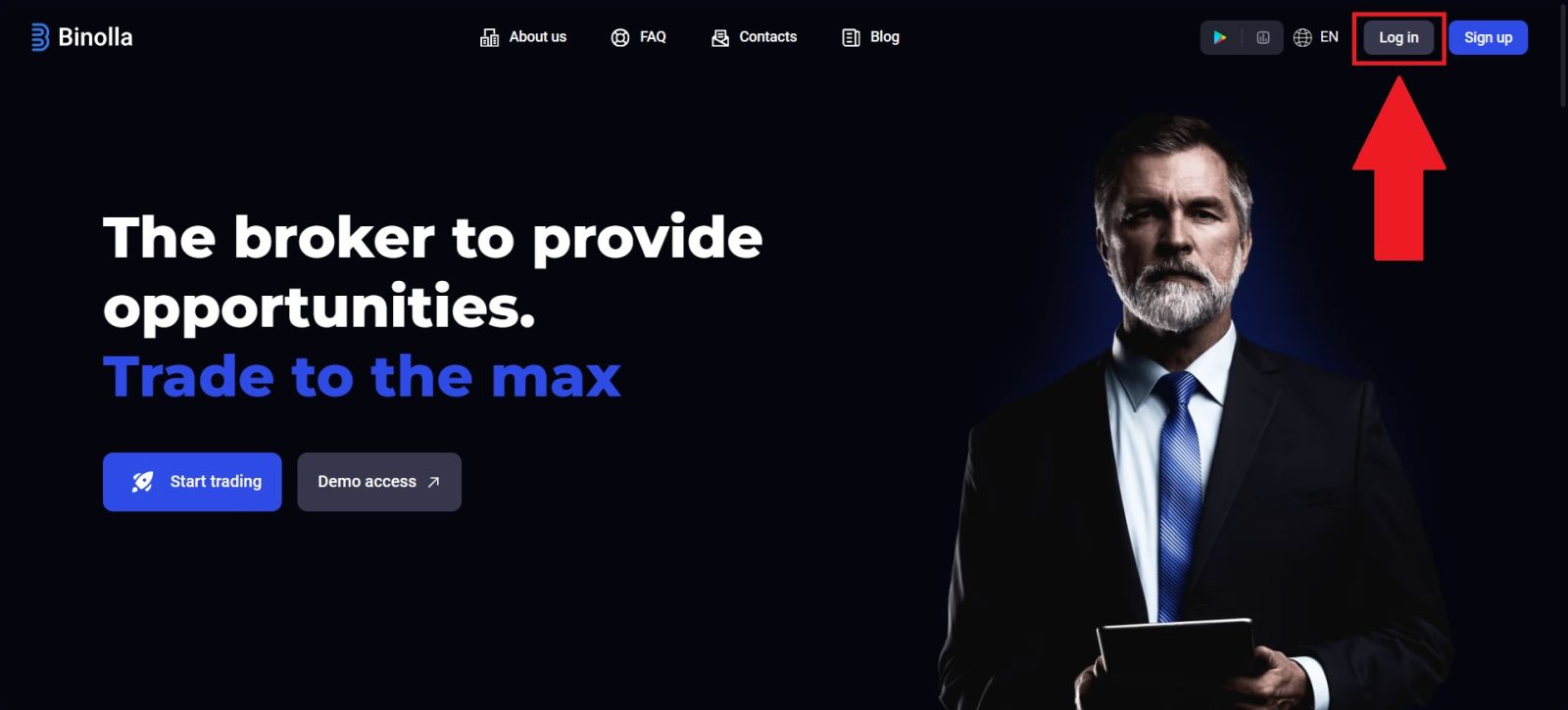
🔐 Step 1: Log in to the official Binolla website
Start by opening the official Binolla website and signing in with your registered email address and password. Always check the domain carefully before entering your credentials, especially on pages involving account balances or payment actions.
Once you are inside the dashboard, confirm that you are working in the correct account environment. Since Binolla gives users access to both demo and real modes, it is important to make sure you are looking at the live account before trying to top up. A deposit sent while you are confused about account mode can create unnecessary frustration, even if the payment itself succeeds.
If you have trouble reaching the dashboard, fix that first using the Binolla Login Guide.
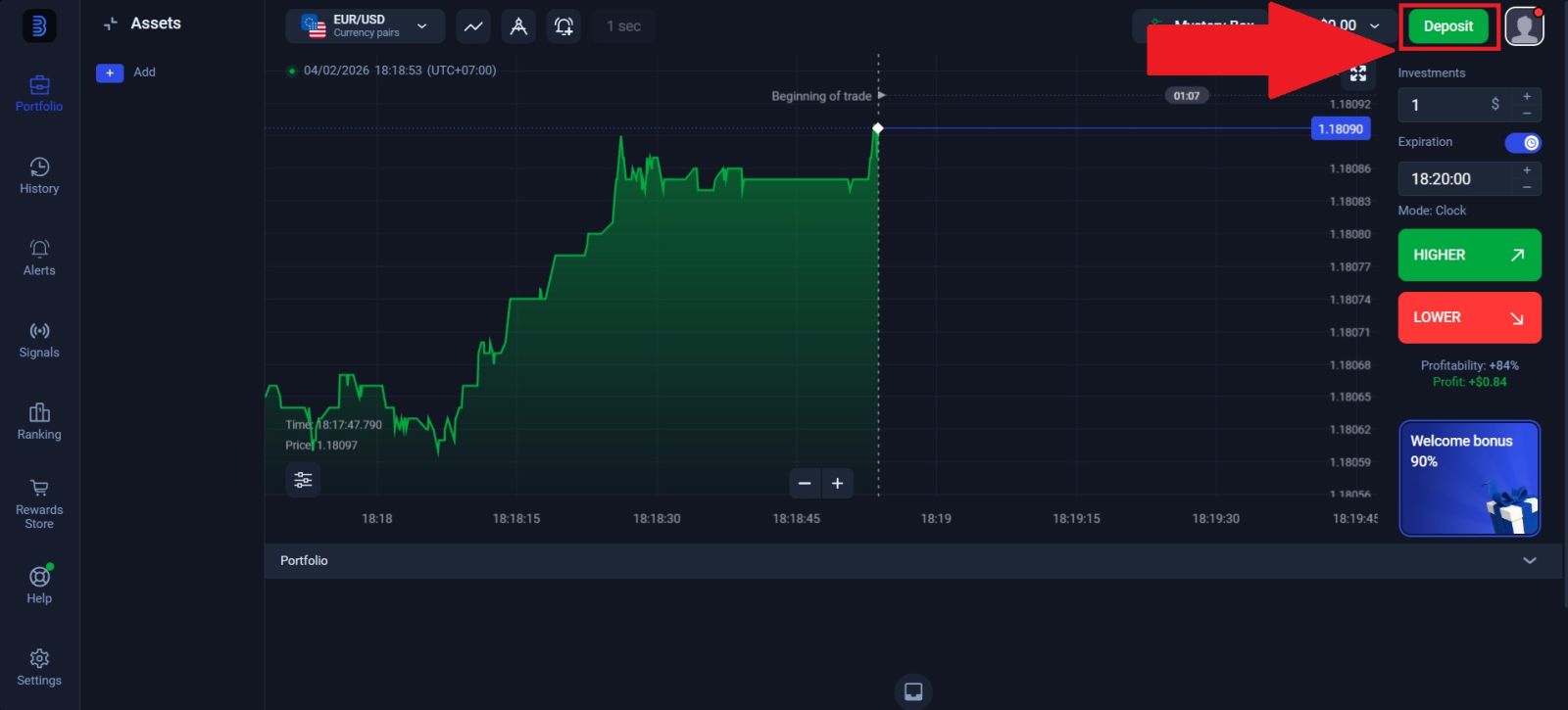
🧭 Step 2: Open the Top Up or Deposit section
After signing in, go to the part of the dashboard where account funding is managed. Binolla states that users can top up their balance in the Top up section using the methods currently available to their region. This is important because the payment list is not fixed for every user and may change over time.
What you should review before choosing a method
Inside the funding area, check:
- which methods are currently available
- the minimum funding amount
- whether the method is crypto-based or another local option
- whether a specific network or transfer route is required
- whether the account shows the correct receiving details
Do not rush through this screen. Funding mistakes often happen not because the platform is difficult, but because users skip the details shown before sending money.
🪙 Step 3: Choose the payment method that matches your region and wallet
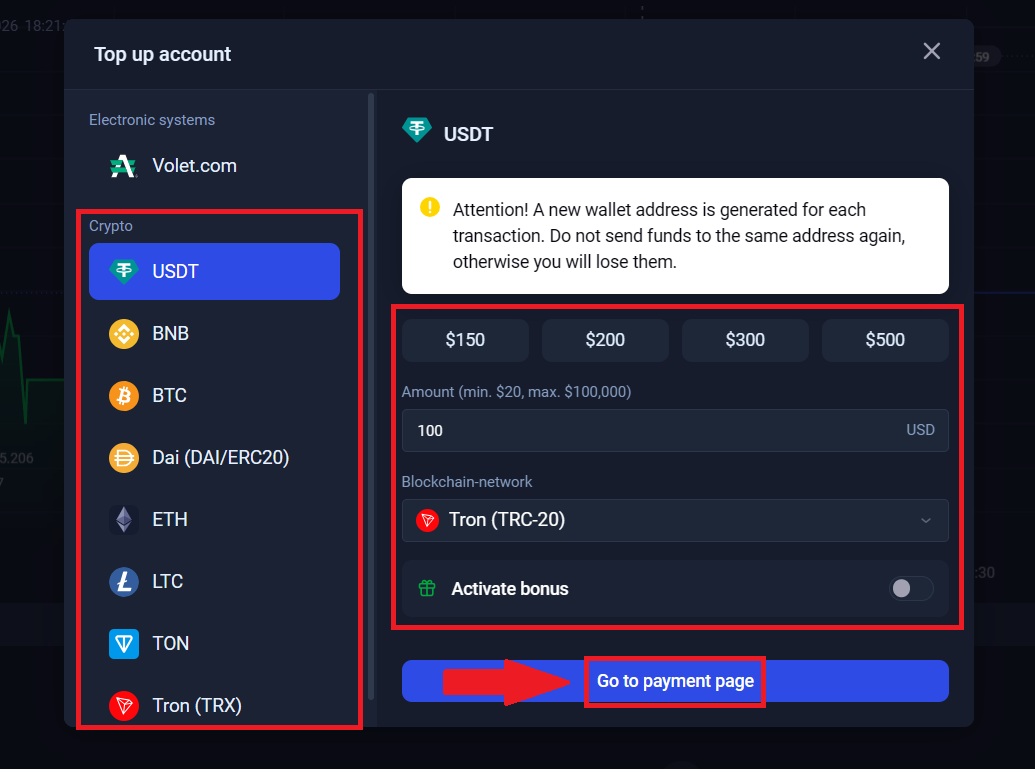
Binolla’s official FAQ says payment methods vary by region and can change over time. That means the best method is not always the same for every user. Some users may see crypto options, while others may see a wider or narrower list depending on location and current availability.
If you are using a crypto deposit method
When a crypto funding option appears, check:
- the exact coin you selected
- the correct blockchain network
- the destination address
- the exact amount you plan to send
This is one of the most sensitive parts of the funding process. A wrong network selection or an incorrect wallet address can delay or break a payment. If the platform shows a network-specific method such as USDT on a certain chain, you should only send funds through that exact compatible route.
If you are using another supported payment method
If the account shows local or alternative methods, review:
- the required amount
- whether identity checks affect the method
- whether the provider page opens correctly
- whether you understand the final confirmation step before submitting
The right method is the one you understand clearly and can complete without guessing.
⏱️ Step 4: Complete the payment and monitor processing
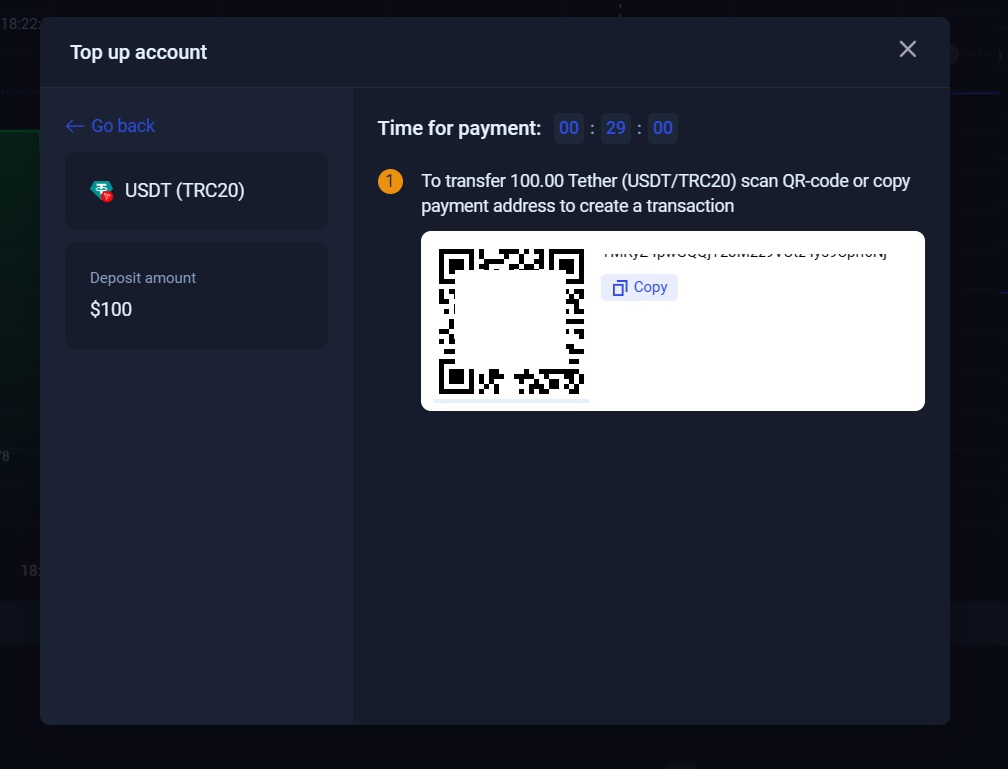
Once you select the method, follow the payment instructions exactly. If the platform gives you a wallet address, copy it carefully or use the QR code if supported. If the platform redirects you to a third-party provider page, review the information before confirming the transfer.
Binolla says it does not charge platform fees for deposits, but payment providers may still apply their own commissions depending on the method used. That is why users should distinguish between a Binolla platform fee and an external payment-system fee.
What to do after sending the funds
After completing the payment:
- keep the transaction record or hash if relevant
- wait for the method’s normal confirmation time
- refresh the account only after a reasonable interval
- avoid submitting duplicate funding requests immediately
If the balance does not update right away, that does not always mean something is wrong. Processing time can depend on the method, the provider, and the number of confirmations required.
📌 Fees, limits, and processing time
Fees, limits, and timing are some of the most searched deposit-related topics, so it is important to frame them correctly.
Deposit fees
Binolla says the platform itself does not charge fees for deposits, but external payment systems may charge commissions. In practical terms, that means your total cost can still depend on the provider you use even when the platform fee is zero.
Minimum amount
The minimum deposit amount depends on the method shown in your account. Users should always confirm the live funding screen rather than assuming a fixed number from another person’s account or an old screenshot.
Processing time
Deposit timing can vary depending on the chosen method. Some transactions may appear quickly, while others can take longer if they depend on blockchain confirmations, provider checks, or regional processing conditions. The safest approach is to review the funding page carefully and keep proof of the transaction until the balance is updated.
⚠️ Common deposit mistakes to avoid
A large percentage of funding issues come from avoidable mistakes rather than system failure.
Sending funds through the wrong network
This is especially important for crypto-based deposits. If the platform shows one blockchain route and you send funds through another, the payment may not arrive correctly.
Using the wrong wallet address or account details
Even a small copy error can cause problems. Always double-check the destination before confirming the transfer.
Funding the wrong account mode
Users who switch between demo and real modes should confirm that they are topping up the real balance, not simply working inside the demo environment.
Ignoring future withdrawal rules
Deposit and withdrawal are connected. Binolla states that withdrawals follow AML-related rules and are generally processed back through the same method used to top up the account. That means choosing your deposit method carefully at the start can make future withdrawals smoother.
🔄 What to do after your deposit is completed
Once your balance is credited, your next step depends on your account stage. If you are still new to the platform, it may be better to review the interface and strategy basics before opening real positions. If your account is already verified and you understand the platform, you can continue directly into trading.
The two most natural next reads after funding are how to trade on Binolla and how to withdraw money from Binolla since both are closely tied to the real-money account workflow.
🎯 CONCLUSION: FUND YOUR BINOLLA ACCOUNT WITH CONFIDENCE IN 2026
Depositing money on Binolla is straightforward when you understand the difference between the demo account and the real account, check the available funding methods in your region, and follow the payment instructions carefully. The most important points are to use the official platform, choose the correct method, double-check transfer details, and remember that provider-side fees or delays may still apply even if the platform itself does not charge deposit fees.
The strongest deposit workflow is a complete one: secure login, correct account mode, careful funding, and a clear understanding of what comes next. After funding the real balance, continue with the Binolla Trading Guide, and when you are ready to plan payouts properly, review the Binolla Withdrawal Guide.
👉 Explore the complete Binolla guide center: Binolla Full Guide
You will find related tutorials for registration, login, verification, withdrawals, and trading.