Binolla Login Guide 2026: How to Access Your Account and Fix Login Problems

Accessing your Binolla account should be quick, but a smooth login depends on using the correct details, the official website, and a secure device. Binolla allows users to enter the platform through their registered account credentials, and once logged in, traders can switch between the demo account and the real account from the dashboard. If anything goes wrong during sign-in, it is important to identify whether the issue comes from incorrect credentials, browser problems, password recovery, or account-related restrictions.
This guide explains how to log in to Binolla step by step, how to avoid common access mistakes, and what to do if your account login does not work as expected.
🔐 Why the login process matters
Logging in is the point where account access, account security, and platform usability all come together. Even if registration was completed correctly, a careless login process can still lead to delays, failed access attempts, or security risks. On a trading platform, that matters more than it does on an ordinary website because login access controls your dashboard, your trading mode, your balance view, and your account settings.
A good login guide is not only about where to click. It should also help users understand how to protect their credentials, how to recognize the official website, and how to respond if access suddenly stops working.
🖥️ Step 1: Open the official Binolla website
The first step is to go to the official Binolla website and check the domain carefully before entering your account details. This is an important habit because fake login pages and phishing copies are a real risk in the trading space.
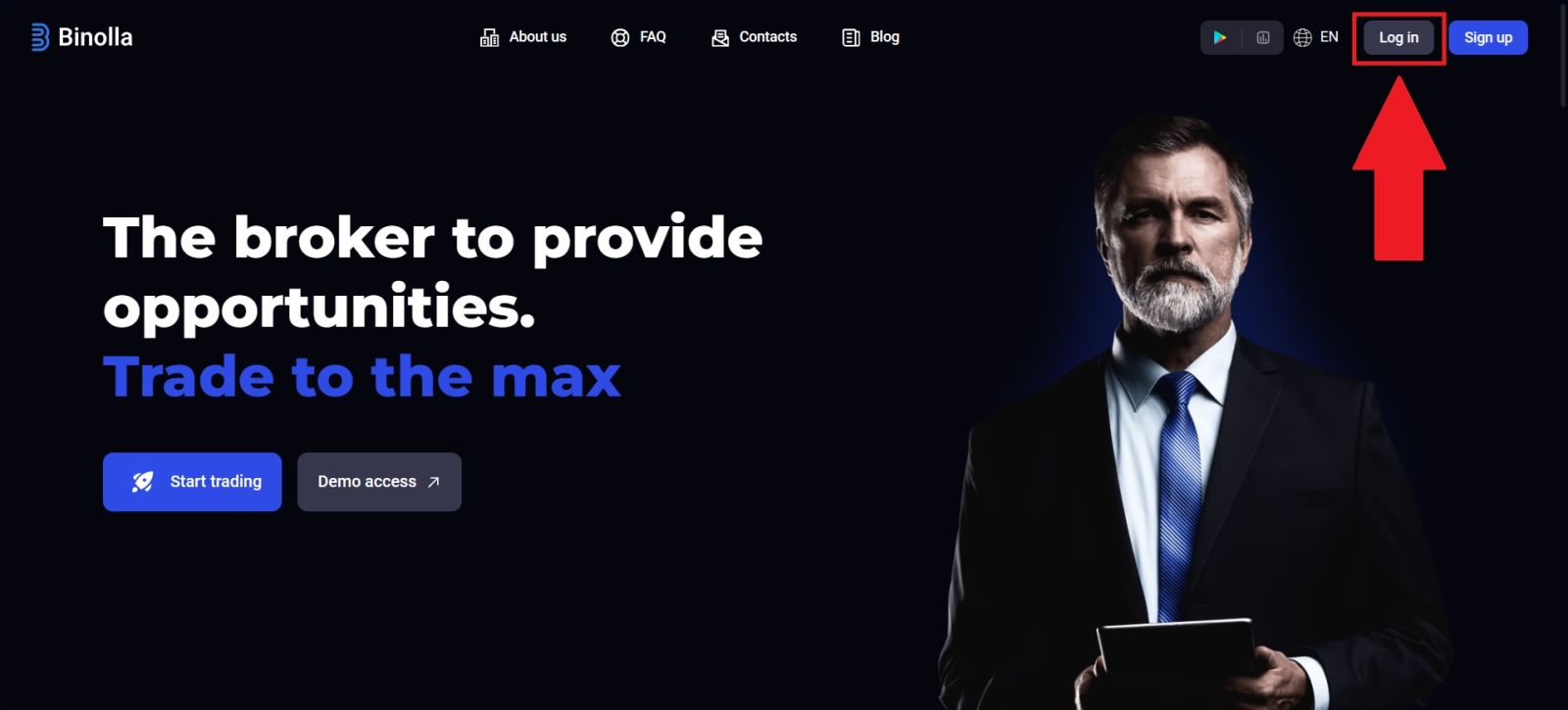
Once you are on the homepage, click the Log in button. Binolla places the main account actions clearly on the site, so the login area should be easy to find from the main screen.
What to check before entering your credentials
Before you type anything, make sure:
- the site address is correct
- the page loads normally and securely
- you are not using a suspicious redirected link
- you are on your own device if possible
If you have not created your account yet, go back and complete the Binolla registration guide first.
📧 Step 2: Enter your login details correctly
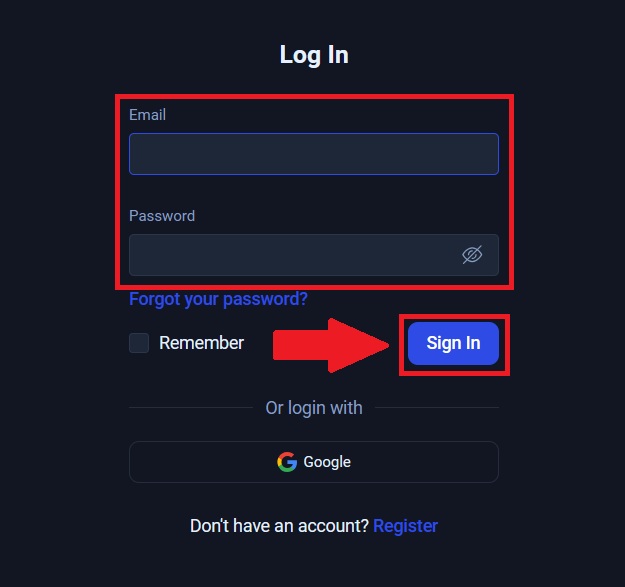
On the login form, enter the email address and password you used when registering. This step sounds simple, but many login problems come from small input mistakes such as wrong letter case, typing errors, or using the wrong email account.
You should review your details carefully before submitting the form:
- enter the same email used during registration
- type your password exactly as created
- check keyboard language and Caps Lock
- avoid auto-filled credentials if you are unsure they are correct
After entering the correct details, click Log in to enter your account dashboard.
Email access matters more than many users expect
Your email is the foundation of account access. If you no longer control the email address linked to your account, even simple login recovery can become more difficult. This is one of the reasons why account setup should be done carefully from the beginning and why users should protect both their trading password and the email connected to the account.
🎯 Step 3: Enter the dashboard and confirm account access
Once login is successful, you should be taken into your personal account area. From there, you can access the main functions of the platform, review your account mode, and continue with the next stage of your account journey.
After signing in, most users should check these things first:
- whether the dashboard loads normally
- whether the correct account is open
- whether the demo and real account options are visible
- whether account settings and security areas are accessible
This is also the best point to continue with verification or funding if you plan to move from demo use into real trading. For that next step, see the Binolla verification guide or how to deposit money on Binolla.
🛠️ Common Binolla login problems and how to fix them
Not every failed sign-in means there is a serious account issue. In many cases, login problems come from simple user-side mistakes or temporary browser issues.
Wrong email or password
This is the most common cause. If your login fails, first check whether:
- you are using the right email address
- your password was typed correctly
- your keyboard layout has changed
- your browser inserted an old saved password
Even one incorrect character can stop access.
Forgotten password
If you no longer remember your password, use the password recovery option on the login page. This is the safest and most direct solution. Do not keep retrying random passwords too many times if you already know the correct one is not available.
Browser or cache issues
Sometimes the login page itself is not the problem. Old browser cache, broken cookies, or an overloaded browser session can block normal access. If the page does not respond correctly, try:
- refreshing the page
- clearing cache and cookies
- opening the site in another browser
- using a private browser window
Weak or unstable connection
If your connection drops during sign-in, the page may fail to load properly or return you to the same screen again. A stable connection is especially important when moving between account pages, security prompts, and payment sections.
Login on the wrong site
If the design looks unusual or the page behaves differently from the normal Binolla layout, stop immediately. Never enter account details into pages you do not fully trust. The safest approach is always to go back to the official homepage and start again from there.
🧩 Account access issues that are not pure password problems
Some login problems are not caused by the password itself. In certain cases, access trouble is connected to account status, policy violations, or incomplete account progression.
Duplicate or prohibited account activity
Binolla states that only one active account is allowed. If users create multiple active accounts or violate platform rules, this may affect account access and account standing. That is why using one properly maintained account is safer than trying to create new ones when a problem appears.
Incomplete account progression
Some users can log in but still cannot move normally through funding or withdrawal processes because their account setup is not complete. For example, the platform requires verified accounts for withdrawals, so login alone does not mean the full account workflow is complete. If you can access the dashboard but cannot complete money-related actions, the next step is usually verification rather than another login attempt.
Device and session safety
Logging in from a public or shared device creates extra risk. Even if the sign-in works, the session may not be safe. Personal devices are always the better choice for account access, especially when you later move into deposits, withdrawals, and live trading.
📌 Best practices for secure Binolla login
A strong login process is part of account protection, not just account access. Good habits here reduce long-term risk.
Protect both your password and your email
Your trading password is only one layer. If your email account is weak, account recovery can become exposed too. Use a strong password for both accounts and keep them private.
Do not share account access
Account sharing is a serious mistake. Your trading account should remain under your own control at all times. Letting another person access the account creates security, compliance, and account-integrity risks.
Log out when necessary
If you access the platform on a temporary device, always log out fully after use. This is especially important if the browser stores your credentials automatically.
Move to the next account step after login
Once access works, do not stop there if your goal is real trading. The natural progression after successful login is:
- check account mode
- complete verification if needed
- review deposit methods
- continue to trading
If you are ready for the next stage after login, continue with the Binolla withdrawal guide or the Binolla trading guide depending on your goal.
🎯 CONCLUSION: ACCESS YOUR BINOLLA ACCOUNT WITH CONFIDENCE IN 2026
Logging in to Binolla should be simple when your account details are correct, your email is still accessible, and you use the official website on a secure device. Most login problems are caused by wrong credentials, password confusion, browser issues, or unsafe sign-in habits rather than by the platform itself.
The best way to avoid access problems is to treat login as part of your full account setup. Use the correct email, protect your password, stay on the official domain, and move step by step into verification, funding, and live trading only after secure access is working properly. To continue the full account path, review the Binolla Verification Guide the Binolla Deposit Guide, and the Binolla Trading Guide.
👉 Go back to the main hub: Binolla Full Guide
It brings together all key Binolla guides, including registration, verification, deposits, withdrawals, and trading.